How DNS Really Works: Tracing google.com Using dig
DNS: The Internet’s Phonebook
DNS (Domain Name System) is often described as the internet’s phonebook—and that analogy works surprisingly well. Humans prefer memorable names like google.com, while computers communicate using IP addresses like 142.250.192.14. DNS exists to bridge this gap by translating domain names into IP addresses.
At first glance, DNS resolution feels simple: you type a URL, and the website loads. But behind the scenes, a carefully layered and distributed system is working to answer a single question:
“Which IP address is responsible for this domain?”
This process involves multiple types of name servers, each with a very specific responsibility.
DNS Resolution Is Recursive
DNS servers are often casually called recursive servers, but that name hides a lot of complexity. The recursive resolver doesn’t magically know every IP address—it asks other DNS servers on your behalf, step by step, until it finds the final answer.
Let’s understand this with a real-world analogy.
Analogy: Finding a Friend After Many Years
Imagine you want to meet your childhood friend, but you haven’t been in touch for years.
You first call their old family home (where they used to live).
Their parents tell you which city your friend currently lives in.
You go to that city and ask around; someone points you to the neighborhood.
In the neighborhood, you ask again and finally get the exact building and room number.
Each step gets you closer, but no single person knows everything.
This is exactly how DNS works.
The DNS Hierarchy
DNS resolution happens in layers:
Root Servers → TLD Servers → Authoritative Servers
Each layer only knows where to look next.
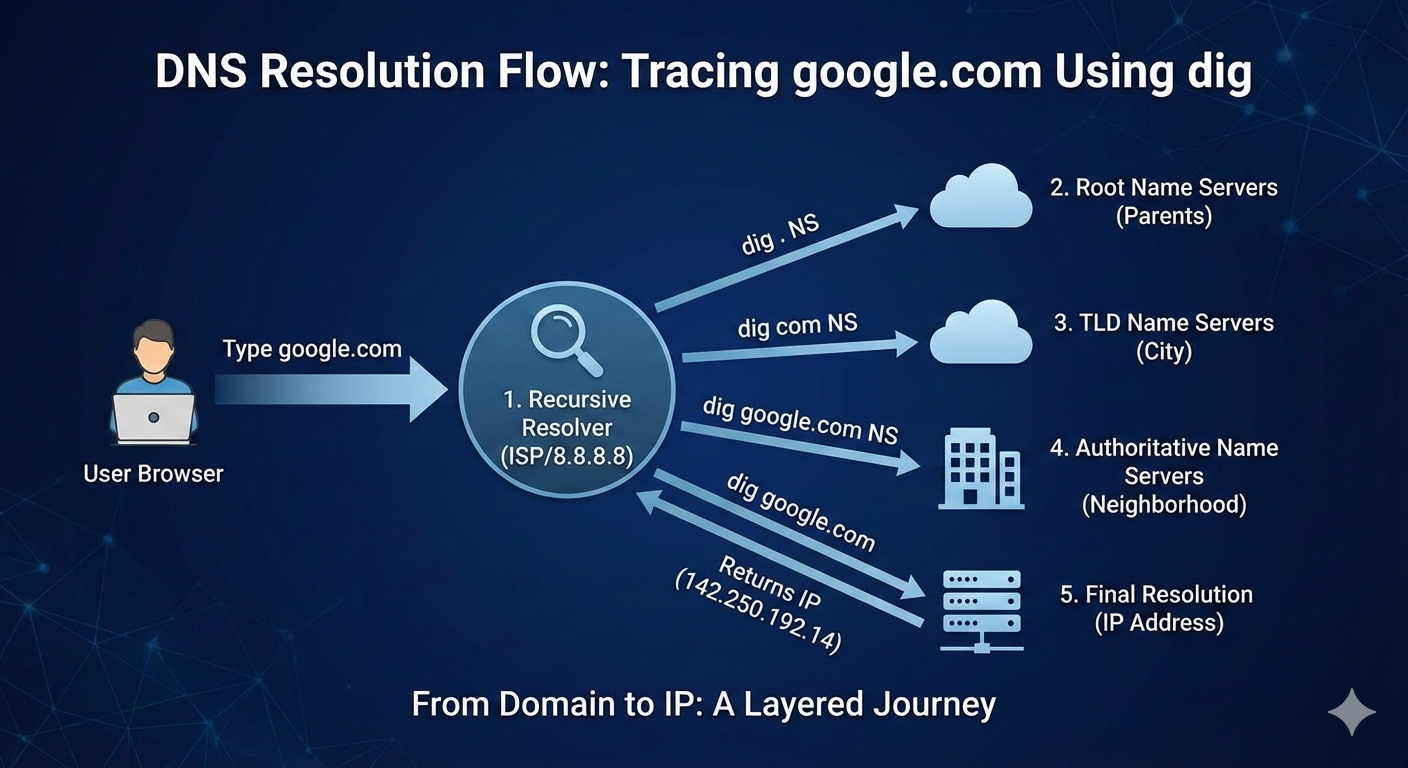
Step 1: The Recursive Resolver
When you type google.com in your browser:
The browser asks a recursive resolver (usually provided by your ISP or a public DNS like 8.8.8.8).
The resolver’s job is to fetch the final IP address and return it to the browser.
If the answer isn’t cached, the resolver starts querying other DNS servers.
Step 2: Root Name Servers (dig . NS)
The recursive resolver first asks the root name servers:
dig . NS
Root servers don’t know the IP of google.com. Instead, they answer:
“I don’t know the address, but I know which servers handle .com.”
They return NS records for Top-Level Domains (TLDs).
This is like calling your friend’s parents and learning which city they live in.
Step 3: TLD Name Servers (dig com NS)
Next, the resolver asks the .com TLD servers:
dig com NS
TLD servers respond with:
“These name servers are responsible for google.com.”
They return NS records pointing to Google’s authoritative name servers.
Now we know the neighbourhood, but not the exact address.
Step 4: Authoritative Name Servers (dig google.com NS)
Now the resolver queries Google’s authoritative servers:
dig google.com NS
Authoritative servers are the source of truth for a domain. They don’t forward queries—they answer definitively.
They respond with:
Which servers manage
google.comAnd ultimately, where to find its IP addresses
This is the equivalent of reaching the correct building.
Step 5: Final Resolution (dig google.com)
Finally, the resolver asks for the A/AAAA record:
dig google.com
The authoritative server replies with:
IPv4 address (A record)
IPv6 address (AAAA record)
The recursive resolver:
Caches the result
Returns the IP to the browser
The browser connects to the server
This entire process usually takes milliseconds.
Why NS Records Matter
NS (Name Server) records:
Define who is responsible for a domain
Enable DNS delegation
Allow DNS to scale globally without central control
Without NS records, the hierarchical model of DNS would collapse.
How Recursive Resolvers Use This Information
Recursive resolvers:
Perform the full lookup chain on your behalf
Cache responses to improve performance
Reduce load on root and TLD servers
This is why repeated visits to the same site feel instant.
DNS is not just a lookup system—it’s a globally distributed, fault-tolerant database that powers the internet. Tools like dig allow us to peel back the layers and see exactly how name resolution works.


